



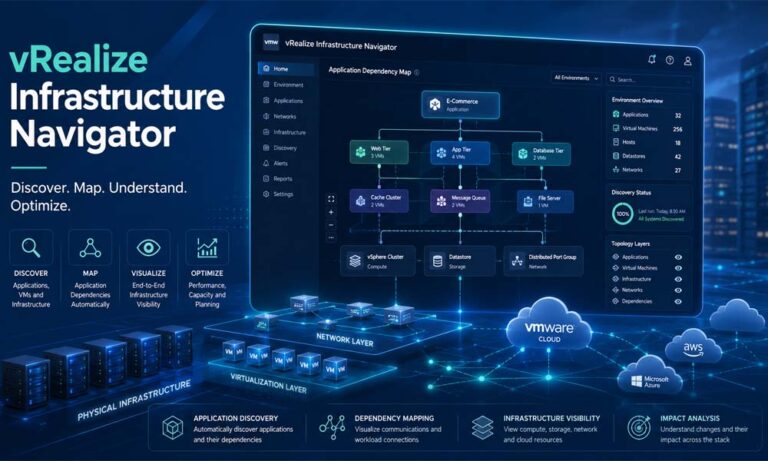
Managing virtual systems can feel like looking at a big city at night. You see many lights. You know many things are working. But you may not know which road connects to which building. You may not know which system depends on another system. This is where things can become risky for IT teams.
In many businesses, apps do not work alone. A simple shopping app may use a web server, an app server, a database, a payment service, and many other small parts. If one part breaks, the whole app may stop working. That is why tools like vRealize Infrastructure Navigator became useful for VMware users.
vRealize Infrastructure Navigator helped IT teams see the hidden links inside virtual systems. It showed which virtual machines were connected. It showed which apps were running. It also helped teams understand what could happen before they moved, changed, or fixed a server.
In this article, we will explain vRealize Infrastructure Navigator in very simple words. We will look at what it is, why it mattered, how virtual management works, how VIN worked, its key features, and why dependency mapping was so important. This guide is written for 2026, so we will also keep in mind that VIN is now an older VMware tool.
What Is vRealize Infrastructure Navigator?
vRealize Infrastructure Navigator was a VMware tool made for virtual environments. It was also known as VIN. Its main job was to help IT teams find applications and understand how they were connected inside VMware vSphere.
In simple words, VIN worked like a map. It helped teams see what was running on virtual machines. It also showed which virtual machines talked to each other. This was very helpful because many businesses had large VMware setups with hundreds or even thousands of virtual machines.
Think of it like a school building. You may see many classrooms, offices, and halls. But you also need to know which rooms depend on power, internet, water, and security systems. In the same way, IT teams need to know how servers, apps, ports, and services are linked. vRealize Infrastructure Navigator helped show those links.
The tool was useful for application discovery and dependency mapping. Application discovery means finding apps and services running on virtual machines. Dependency mapping means showing how these apps and machines depend on each other.
For example, VIN could show that a web server was connected to an app server. Then, it could show that the app server was connected to a database server. This helped IT teams avoid mistakes when moving or changing systems.
Why vRealize Infrastructure Navigator Was Important
vRealize Infrastructure Navigator was important because virtual systems can become very complex. In the past, many businesses used physical servers. One server often had one clear job. But with virtualization, many virtual machines can run on one physical server. Many apps can also depend on each other in ways that are not easy to see.
This creates a big problem. If an IT team does not know how apps are connected, a small change can cause a big issue. For example, they may restart one virtual machine without knowing that another important app depends on it. That simple action could cause downtime.
Downtime can be costly. It can stop sales. It can affect customers. It can slow down workers. In some cases, it can also create security or compliance problems. This is why visibility is so important in virtual management.
vRealize Infrastructure Navigator helped remove blind spots. It gave teams a clearer view of what was happening behind the scenes. Instead of guessing, admins could look at dependency maps and make better choices.
This was especially helpful during migrations. A migration means moving an app, server, or workload from one place to another. Without a clear map, teams may move one part but forget another part. VIN helped teams move related systems together.
It was also useful for disaster recovery planning. If a system failed, IT teams needed to know which apps were most important and which systems should come back first. VIN made that planning easier by showing key connections.
How Virtual Management Works
Virtual management means taking care of virtual machines, apps, services, storage, and networks. These parts often work together inside a virtual environment. VMware vSphere is one common platform used by businesses to manage these virtual systems.
A virtual machine is like a computer inside a computer. It can run an operating system and apps, just like a normal physical server. But it does not need its own separate hardware. Many virtual machines can run on one large physical server.
This sounds simple at first. But when a company grows, the number of virtual machines can grow fast. One team may create a VM for a website. Another team may create one for a database. Another may create one for testing. Over time, the environment can become hard to track.
Now imagine a company has 500 virtual machines. Some are used daily. Some are old. Some are connected to important business apps. Some may no longer be needed. Without a tool, it becomes hard to know what each VM does.
This is where vRealize Infrastructure Navigator helped. It gave IT teams a clearer picture of the virtual world. It did not only show that a VM existed. It helped show what was running inside it and how it connected to other systems.
Virtual management is not only about checking CPU, memory, and storage. Those things are important, but they are not enough. Teams also need to know app relationships. They need to know which systems depend on each other. This is the area where VIN was useful.
For example, a server may look quiet. It may not use much CPU. But it could still be very important because another system depends on it. Without dependency mapping, a team may think that server is safe to shut down. That could lead to a serious problem.
How vRealize Infrastructure Navigator Works
vRealize Infrastructure Navigator worked by using an agentless discovery method. This means admins did not need to install a separate agent on every virtual machine. That made it easier to use in large VMware environments.
VIN used VMware Tools, network traffic, and port details to find apps and services. It looked at how virtual machines communicated. It also checked which ports were being used. From this information, it could understand what services were active.
For example, if a virtual machine used port 80 or 443, VIN could detect web server activity. If it saw port 1433, it could point to Microsoft SQL Server. If it saw port 3306, it could point to MySQL. These details helped build a clearer app map.
Once the tool found these services, it created a visual map. This map showed how virtual machines and apps were connected. Admins could use this map inside the VMware environment to understand their systems better.
Let’s use a simple example. A company has an online store. The store has a web server, an app server, and a database server. The web server shows the website. The app server handles the order process. The database server stores customer and order data.
If the team wants to move the web server, they need to know what else is connected to it. vRealize Infrastructure Navigator could show that the web server depends on the app server. It could also show that the app server depends on the database. This helped the team plan the move safely.
This kind of visibility saved time. It also reduced mistakes. Instead of asking many teams or checking old notes, admins could use the map to see real connections in the environment.
Key Features of vRealize Infrastructure Navigator
One of the main features of vRealize Infrastructure Navigator was automatic application discovery. This helped IT teams find apps running inside virtual machines without doing everything by hand. Manual tracking can be slow and full of mistakes, especially in large systems.
Another key feature was dependency mapping. This was one of the biggest reasons businesses used VIN. It showed how apps, virtual machines, services, and ports were linked. This made planning much easier.
VIN also offered real-time or near real-time visibility. This helped admins see changes in the environment more clearly. When systems changed, the maps could help teams understand what was affected.
The tool also worked with VMware products. It integrated with the vSphere Web Client and vRealize Operations. This was useful because many VMware admins already used these tools every day. VIN added more app-level visibility to the VMware environment.
Another helpful feature was policy-based grouping. This allowed admins to group virtual machines by business service or app type. For example, all virtual machines used for a finance app could be grouped together. This made monitoring and planning easier.
Impact analysis was also important. It helped teams understand what could be affected before they made a change. For example, before moving a virtual machine, admins could check which apps depended on it. This reduced the chance of surprise downtime.
Security and compliance support was another useful part of VIN. The tool could help find unknown apps, open ports, or unapproved communication paths. This helped teams prepare for audits and improve control over their environment.
In short, VIN was not just a simple monitoring tool. It helped answer a deeper question: “What is connected to what?” For virtual management, that answer was very valuable.
vRealize Infrastructure Navigator and Dependency Mapping
Dependency mapping was the heart of vRealize Infrastructure Navigator. It helped IT teams understand the relationships between apps and virtual machines. This was important because most business apps do not work alone.
A dependency is something that one system needs in order to work. For example, a website may need a database. An app server may need an authentication service. A payment system may need a secure network connection. If one part fails, the other part may also stop working.
Without dependency mapping, teams may only see separate virtual machines. They may see names, CPU usage, memory usage, and storage details. But they may not see the full story. They may not know that one small VM is part of a larger business app.
vRealize Infrastructure Navigator made this easier by showing visual links. It could show that one VM was talking to another VM through a certain port. It could also show which services were involved. This helped admins understand the app flow.
For example, imagine a company wants to update a database server. Before doing that, the IT team needs to know which apps use that database. If they do not know, they may take the database offline and break several apps at once.
With VIN, the team could look at the dependency map first. They could see which systems were connected. Then they could plan the update during a safer time. They could also warn the right teams before making the change.
This made dependency mapping useful for many tasks. It helped with upgrades. It helped with patching. It helped with cloud migration. It helped with disaster recovery. It also helped with security reviews.
The best part was that it turned hidden information into something visible. This is why many VMware users found vRealize Infrastructure Navigator helpful in older virtual environments.
Benefits of vRealize Infrastructure Navigator
One of the biggest benefits of vRealize Infrastructure Navigator was better visibility. In simple words, it helped IT teams see what was really happening inside their virtual setup. Instead of only seeing a list of virtual machines, teams could see apps, services, ports, and connections.
This was very useful in large companies. A business may have hundreds of virtual machines. Some may support websites. Some may support payment systems. Some may support customer data. Without a clear view, it becomes hard to know which systems are truly important.
vRealize Infrastructure Navigator helped reduce this confusion. It showed which virtual machines were connected to each other. It also showed which apps depended on other services. This made IT work safer and easier.
Another big benefit was lower risk. Before moving or updating a virtual machine, admins could check the dependency map. This helped them understand what could break before making a change.
For example, imagine a team wants to shut down an old server. It may look unused at first. But the map may show that a key business app still connects to it. This warning could save the company from downtime.
VIN also helped with disaster recovery. When a system fails, teams need to bring the most important services back first. vRealize Infrastructure Navigator made this easier by showing which systems were linked and which ones supported important apps.
It also helped with cost control. If the tool showed old or unused services, teams could clean them up. This helped reduce waste. It also made the virtual environment easier to manage.
Best Uses of vRealize Infrastructure Navigator
vRealize Infrastructure Navigator was useful in many real business situations. One common use was data center consolidation. This means moving systems from many data centers into fewer locations. Before doing this, teams needed to know which servers and apps were connected.
Without this knowledge, a company could move one server and leave another needed server behind. That could break an app. VIN helped teams avoid this by showing the full app path before the move.
Another important use was cloud migration. Many businesses wanted to move apps from private data centers to cloud platforms. But moving apps is not always simple. Some apps are connected to databases, storage, security tools, and other services.
With vRealize Infrastructure Navigator, teams could see which parts should move together. This helped avoid broken connections after migration. It also made planning more careful and less risky.
VIN was also helpful for security audits. Security teams could use it to find unknown apps, open ports, and strange connections. This made it easier to spot risks inside the virtual environment.
It also supported performance planning. If one app was using too many resources, teams could study its connections. They could then decide whether to move it, resize it, or place it on better storage.
Disaster recovery planning was another strong use. VIN helped teams understand which systems needed to start first after a failure. This helped reduce downtime and keep important business services running.
vRealize Infrastructure Navigator in Cloud Planning
Cloud planning is one area where dependency mapping becomes very important. In 2026, many businesses use hybrid cloud, private cloud, public cloud, and multi-cloud setups. This means apps may run in many places at once.
When a company moves an app to the cloud, it cannot only move one virtual machine and hope everything works. It must understand the full app chain. A web server may need an app server. The app server may need a database. The database may need storage, backup, and security services.
This is where vRealize Infrastructure Navigator offered value in older VMware setups. It helped teams see these links before they made a move. This helped them group related workloads together.
For example, a company may want to move a customer portal to the cloud. At first, it may look like one app. But after checking the map, the team may find that it depends on a login service, a payment service, and an old database. This changes the whole plan.
Without dependency data, cloud migration can become risky. Apps may fail after moving. Users may face errors. Teams may spend days fixing broken links. VIN helped reduce this risk by giving a clearer picture before the move.
However, it is also important to understand one thing. vRealize Infrastructure Navigator was built for older VMware environments. It was not made for today’s full cloud-native world. It does not fully match modern tools that support containers, Kubernetes, microservices, and large multi-cloud systems.
So, in 2026, VIN is best understood as a helpful legacy tool. Its idea is still very important. But most modern businesses now need newer tools with stronger cloud support.
Limits of vRealize Infrastructure Navigator
Even though vRealize Infrastructure Navigator was useful, it had clear limits. The biggest limit is that it is now an older VMware tool. It is no longer the right choice for most modern IT environments.
One major issue is support. VIN is no longer supported in newer VMware setups. This means businesses should not treat it as a future-ready tool. Unsupported tools can create problems with updates, security, and compatibility.
Another limit is modern cloud support. Today, many apps are built with containers, Kubernetes, microservices, and cloud services. VIN was not designed for this kind of fast and flexible world.
Modern apps can change quickly. A container may start, stop, or move in seconds. A microservice may connect to many other small services. Older dependency maps may not show this clearly enough.
VIN was also closely tied to older VMware tools and older vSphere environments. This made it less useful as VMware moved toward newer platforms and modern interfaces.
It also had limits in analytics. New tools can use AI, alerts, smart learning, and predictive checks. They can warn teams before problems become serious. VIN did not offer the same level of smart insight.
So, while vRealize Infrastructure Navigator was valuable in its time, it is not enough for most modern IT needs in 2026.
Is vRealize Infrastructure Navigator Still Supported?
No, vRealize Infrastructure Navigator is not a modern supported tool today. It is mainly seen as a legacy VMware product. This is very important for readers to understand.
Some companies may still have old VMware systems where VIN was once used. In those cases, the tool may still be part of their history or old setup. But using old and unsupported tools can bring risk.
Support matters because IT systems need security updates, bug fixes, and compatibility with newer platforms. If a tool is no longer supported, it may not work well with new versions. It may also create security concerns.
For this reason, businesses should not start new projects with VIN. They should instead look at modern tools that are still active and supported.
If a company still depends on vRealize Infrastructure Navigator, it should make a transition plan. This plan should include reviewing current dependency maps, checking old VMware systems, and testing newer tools before fully moving away.
A smart move is to test replacements in a safe environment first. This helps the team learn the new tool without putting important systems at risk.
Best Alternatives to vRealize Infrastructure Navigator
Since vRealize Infrastructure Navigator is no longer the best option for modern needs, businesses should look at newer tools. These tools offer better support for cloud, hybrid systems, containers, and modern apps.
One VMware option is VMware Aria Operations. This platform helps teams monitor performance, manage resources, and understand their environment. It is more suited for modern VMware and cloud setups.
Another option is VMware Aria Operations for Networks. This tool focuses on network visibility and flow analysis. It helps teams understand how systems communicate across virtual, cloud, and hybrid environments.
There is also the Service Discovery Management Pack for vRealize Operations. This can help discover services running on virtual machines and show relationships between them. For some VMware users, this may be a useful path after VIN.
Third-party tools can also help. Dynatrace is known for deep app monitoring and smart issue detection. Datadog is popular for cloud-scale monitoring. SolarWinds Virtualization Manager can help with VMware and Hyper-V visibility. AppDynamics is another strong tool for app performance monitoring.
The best choice depends on the company. A VMware-heavy business may prefer VMware Aria tools. A cloud-first business may prefer Datadog or Dynatrace. A company with mixed systems may need a tool that supports many platforms.
The key point is simple. Modern environments need modern tools. vRealize Infrastructure Navigator helped start the idea, but newer tools now do the job in a stronger way.
Common Mistakes to Avoid
One common mistake is moving a virtual machine without checking its dependencies. This can cause serious issues. A VM may look small, but it may support an important app.
Another mistake is trusting old records too much. Many teams keep spreadsheets or notes about their systems. But these notes can become outdated fast. Real systems change often. That is why discovery tools and maps are so useful.
A third mistake is using old tools for new cloud systems. vRealize Infrastructure Navigator may help explain older VMware setups, but it should not be the main tool for modern cloud-native apps.
Some teams also ignore security risks. If a tool is no longer supported, it may not meet current security needs. This can be a problem during audits or compliance checks.
Another mistake is not training the IT team. Even the best tool will not help much if people do not know how to use it. Teams need to understand maps, alerts, services, and dependency data.
It is also a mistake to wait until something breaks. Virtual management should be proactive. This means teams should plan ahead, check risks early, and fix weak points before users are affected.
Future of Virtual Management
Virtual management is changing fast. In 2026, businesses are not only managing virtual machines. They are also managing cloud apps, containers, APIs, microservices, and remote systems.
This means visibility is more important than ever. IT teams need to know what is running, where it is running, and what it depends on. A small hidden issue can affect many users.
The future of virtual management will use more AI and automation. Tools will not only show maps. They will also suggest fixes, predict risks, and help teams act faster.
For example, a modern tool may notice that an app is slowing down. It may find the root cause and tell the team which service is causing the issue. In some cases, it may even help fix the problem automatically.
This is called smarter management. It saves time. It reduces stress. It also helps businesses avoid downtime.
vRealize Infrastructure Navigator was an early step in this journey. It helped teams understand why app visibility matters. But the future needs tools that are faster, smarter, and ready for cloud-first systems.
Conclusion
vRealize Infrastructure Navigator was a helpful VMware tool for virtual management. It gave IT teams a better way to see apps, virtual machines, services, ports, and dependencies.
Its main value was simple but powerful. It made hidden connections visible. This helped teams plan migrations, reduce downtime, support disaster recovery, and improve security checks.
For older VMware environments, VIN played an important role. It helped admins understand what was happening behind the scenes. It also helped businesses make safer choices before changing systems.
But in 2026, vRealize Infrastructure Navigator should be seen as a legacy tool. It is no longer the best choice for modern cloud, hybrid cloud, Kubernetes, or microservice-based systems.
Businesses that still use VIN should plan carefully. They should review their old systems, save important dependency data, and move toward supported tools. VMware Aria Operations, VMware Aria Operations for Networks, Dynatrace, Datadog, SolarWinds, and AppDynamics are some options to explore.
In the end, the lesson from vRealize Infrastructure Navigator is still very useful. You cannot manage what you cannot see. When IT teams have clear visibility, they can make better choices. They can protect apps. They can reduce risk. And they can build stronger virtual systems for the future.
You may also read: Tech Giants Envision Future Beyond Smartphones: What Comes Next?
