




Imagine your marketing team has a product launch tomorrow. The landing page needs a copy update, a new banner, and a tweaked CTA, but the one developer who handles the website is deep in a sprint and won’t be free until next week.
This bottleneck is something thousands of business teams live with every day. It slows campaigns, delays communications, and creates a frustrating dependency between people who own content and people who ship code.
That’s exactly the problem a visual HTML editor solves. By giving non-technical users a clean, intuitive interface to create and edit web content, it puts publishing power back where it belongs, with the people closest to the content itself.
In this article, we’ll break down what visual HTML editors are, why teams across marketing, support, and operations are embracing them, and which features make the biggest difference for everyday users.
Key Takeaways
- A visual HTML editor lets anyone create and publish web content without knowing a single line of code.
- Non-technical teams reduce dependency on developers for routine content updates.
- Real-time preview, drag-and-drop, and template features dramatically speed up publishing workflows.
- Consistent formatting and standardised layouts help maintain brand identity across teams.
- Tools like Froala offer a lightweight, user-friendly editing experience that scales with growing content needs.
What Is a Visual HTML Editor?
Most people who create content for the web don’t think in tags and attributes; they think in headlines, paragraphs, and images. A visual HTML editor bridges that gap by giving users a familiar word-processor-style interface while generating clean HTML automatically in the background.
Understanding Visual Editing
A visual HTML editor, often called a WYSIWYG editor (What You See Is What You Get), is a content editing interface where what you see on screen matches what your audience will see on the published page. You click bold, and the text turns bold. You drag in an image, and the image appears without the need for any HTML.
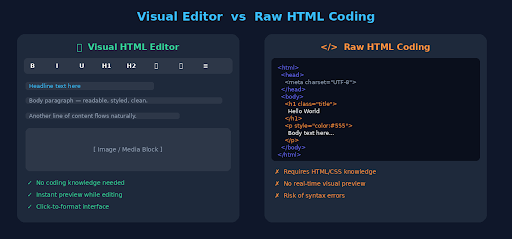
Compare that to traditional HTML coding, where a content update might look something like:
<h2 class=”section-title”>Our New Feature Is Live</h2>
<p style=”color: #333; line-height: 1.6;”>We’re excited to announce…</p>
For a developer, this is second nature. For a copywriter, social media manager, or HR coordinator, it’s an unnecessary barrier between their idea and its publication.
Visual editing removes that barrier entirely. The editor handles the markup; the user handles the message.
Here’s a side-by-side look at the visual editing experience compared to writing raw HTML; the difference in accessibility is clear.
Core Features of a Visual HTML Editor
While the specific feature set varies by platform, most capable visual HTML editors share a common foundation:
- Rich text formatting: Bold, italic, headings, lists, and alignment controls accessible from a familiar toolbar.
- Drag-and-drop content editing: Reorder sections, move blocks, and build layouts without touching code.
- Media embedding and image support: Insert, resize, and manage images, videos, and files inline.
- Templates and reusable content blocks: Pre-built layouts that maintain consistency and save time.
- Real-time content preview: See exactly how content will look before it goes live.
These features combine to make the editor feel less like a technical tool and more like a creative workspace.
With the basics established, let’s get into the real question: why are non-technical teams choosing visual editors over traditional approaches?
Why Non-Technical Teams Prefer Visual HTML Editors
The shift toward visual editing isn’t just about comfort; it’s about real, measurable improvements in how teams work. From faster turnarounds to better cross-functional collaboration, the benefits show up at every stage of the content process.
Faster Content Creation
Speed is the most immediate benefit. When a team member doesn’t need to open a ticket, wait for a developer, or learn CSS to make a simple update, content moves from draft to published in a fraction of the time.
- No coding skills required; anyone on the team can contribute.
- Editing workflows become simpler and more direct.
- Publishing timelines shrink from days to hours (sometimes minutes).
- Teams manage content independently without bottlenecks.
This matters most during time-sensitive moments: a product launch, a flash sale, a breaking company announcement. Visual editors turn what used to be a multi-day process into something a content manager can handle before lunch.
Reduced Dependency on Developers
One of the most commonly cited pain points in organisations with growing content needs is the developer bottleneck. Every “quick copy change” or “small layout tweak” becomes a task on someone else’s backlog.
Visual HTML editors shift that dynamic significantly:
- Teams make routine updates without needing technical assistance.
- Back-and-forth communication between content and engineering is minimised.
- Campaign and content updates move faster, with no sprint cycles required.
- Operational efficiency improves across the board.
Developers can focus on what they do best: building features, maintaining infrastructure, solving complex problems, while content teams handle what they do best: communicating with audiences.
Easier Collaboration Across Teams
Content rarely lives with one person. A blog post might touch a writer, an SEO specialist, a designer, and a manager before it goes live. A help centre article might be drafted by support, reviewed by legal, and approved by comms. Visual editors make that kind of multi-party collaboration much more manageable.
- Multiple departments can contribute content using the same familiar interface.
- Approval and review processes are simpler when everyone can see and interact with the content.
- Consistent templates help maintain uniformity across different contributors.
- Agile content workflows become practical, not just theoretical.
When everyone speaks the same visual language, collaboration accelerates.
Better Content Consistency
Without a standard editing environment, formatting issues can appear quickly. One writer uses H2 while another uses bold text. One team’s landing page uses a different button style. Over time, these small differences can weaken your brand’s consistency and trust.
Visual editors address this at the source:
- Formatting options and layout standards are built into the tool.
- Design and formatting errors are reduced through guided interfaces.
- Brand consistency is easier to maintain when templates define the guardrails.
- Readability and user experience improve across all published content.
Consistency isn’t just about looks. It shows professionalism and helps build trust with your audience.
Different teams use visual editors in distinct ways. Let’s look at the most common use cases across a typical organisation.
How Different Teams Use a Visual HTML Editor
The appeal of a visual HTML editor isn’t limited to one department. Across different industries and teams, people adopt visual editing tools for different reasons that fit their needs.
Marketing and Content Teams
Marketing teams are often the heaviest users of visual editors, and for good reason: their content volume is high, their timelines are tight, and their audience expectations are demanding.
Common use cases include:
- Creating blog posts and landing pages without relying on engineering resources.
- Updating promotional campaigns quickly when messaging needs to shift.
- Managing website content efficiently across multiple channels and formats.
- Publishing independently without waiting on development queues.
When a campaign needs a quick change, a good visual editor helps teams make updates and respond right away.
Customer Support and Documentation Teams
Support teams are often underserved when it comes to content tools. They need to create and update knowledge base articles, FAQs, and onboarding guides, often at high volume, but they’re rarely given technical resources to do it well.
A visual HTML editor changes that:
- FAQs and help centre articles can be created and updated without IT involvement.
- Knowledge base content stays current without manual HTML editing.
- Onboarding and training materials are easier to produce and maintain.
- Documentation workflows are simplified across the support function.
For customer-facing documentation, keeping content accurate and up to date is essential. Visual editors make that much easier.
Internal Communication Teams
Internal teams such as HR, employee engagement, and leadership communications often rely on email or presentation tools to create content. A visual HTML editor gives them a simpler and more efficient way to do it.
- Internal announcements can be created with professional formatting.
- Employee newsletters are easier to build and brand-consistent.
- Company updates are published faster without routing through IT.
- Internal content sharing becomes more streamlined and scalable.
Content quality improves when the team creating it has the right tools.
Not all features are equally important to non-technical users. Some have a much bigger impact on everyday use than others.
Key Features Non-Technical Users Value Most
When non-technical users evaluate a visual HTML editor, they’re not looking for the most powerful tool; they’re looking for the most usable one. A few features consistently stand out as the most important.
Drag-and-Drop Editing
Drag-and-drop is more than a convenience feature; for non-developers, it’s the difference between a tool they’ll actually use and one that collects dust.
- Page building becomes intuitive and explorable.
- Technical complexity is abstracted behind a tactile interface.
- Content arrangement and restructuring are quick and visual.
- Editing speed increases dramatically compared to code-based alternatives.
When users can see and move content the way they’d arrange objects on a desk, the learning curve nearly disappears.
Real-Time Preview Functionality
Publishing without seeing the final result is like painting with your eyes closed. Real-time preview removes that uncertainty entirely.
- Edits are visible instantly, before any content goes live.
- Formatting mistakes are caught during editing, not after publishing.
- Editors feel more confident making changes when they can see results immediately.
- Publishing errors decrease significantly.
This feature alone is enough to win over teams who’ve had bad experiences with HTML-based publishing tools.
User-Friendly Interface
The best features in the world don’t help if the editor itself is confusing or intimidating. Non-technical users prioritise interfaces that feel immediately familiar.
- Easy navigation for users with no web development background.
- A minimal learning curve means new team members can onboard quickly.
- Broad adoption across teams is easier to achieve with accessible design.
- Training overhead decreases when the tool is intuitive by design.
A user-friendly interface isn’t a nice-to-have; it’s what determines whether an editor actually gets used.
Understanding why teams are moving toward visual editors also means understanding what they’re moving away from.
Why Businesses Are Moving Away From Manual HTML Editing
For years, manual HTML editing was the only option for web content management. It worked, but it came with significant friction that compounded over time.
Limitations of Traditional HTML Coding
From relying on developers for small changes to dealing with formatting mistakes, manual HTML editing creates extra work for every team that manages content.
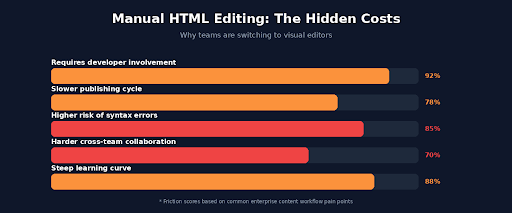
Manual HTML editing presents real challenges for content-driven organisations:
- It requires technical expertise most content professionals simply don’t have.
- Editing and publishing workflows are slower when code review is required.
- The risk of syntax and formatting errors is higher without real-time visual feedback.
- Teams remain dependent on developers for updates that should be self-serviceable.
These limitations don’t just slow down publishing; they affect morale, autonomy, and team velocity.
Rise of No-Code and Visual Content Tools
The broader shift toward no-code tools reflects a recognition that technical barriers shouldn’t exist where they don’t need to. Visual HTML editors are part of that movement.
- Website content management is faster when teams don’t need to write code.
- Collaboration across departments improves when everyone uses the same interface.
- Business teams gain flexibility to manage content on their own terms.
- Productivity and scalability improve as content operations grow.
Visual editors aren’t replacing developers; they’re freeing them from tasks that shouldn’t require development in the first place.
If you’re evaluating a visual HTML editor for your team, here’s what to prioritise.
Choosing the Right Visual HTML Editor
Not all visual editors are built equally. The right choice depends on your team’s workflow, technical environment, and content volume.
Important Features to Look For
When comparing options, these capabilities tend to have the highest impact on day-to-day usability:
- Easy-to-use interface: The tool should require minimal training to get productive.
- Responsive design support: Content should look right on any device without extra configuration.
- Media and file management: Seamless handling of images, documents, and embedded content.
- Collaboration-friendly features: Commenting, review modes, or role-based access where needed.
- Clean HTML output: The editor should generate well-structured, standards-compliant HTML automatically.
Why Businesses Choose Froala
Froala’s visual HTML editor is a well-regarded option in this space, particularly for teams that need a balance of power and simplicity. A few things stand out:
- Its intuitive editing experience makes it accessible to users across technical backgrounds.
- It’s lightweight and fast, which matters when the editor is embedded in larger platforms.
- It’s designed with non-technical users in mind, without sacrificing the flexibility technical teams need.
- Its clean HTML output supports efficient, error-free content publishing workflows.
Froala is worth evaluating as part of any visual editor comparison, especially for teams embedding a rich text editor into an existing product or platform.
Why Visual HTML Editors Matter
The case for visual HTML editors comes down to one simple truth: content creation shouldn’t require a computer science degree.
When non-technical teams are equipped with the right tools, they work faster, collaborate more effectively, and produce more consistent output, without constantly pulling developers into content tasks. The bottlenecks shrink, the publishing timelines compress, and the quality improves.
Visual HTML editors reduce the gap between content strategy and content execution. They let marketing teams launch campaigns on their own timeline, support teams keep documentation current, and internal comms teams communicate without barriers.
For organisations looking to scale their content operations without scaling their engineering dependency, a visual HTML editor isn’t just useful; it’s essential.
Tools like Froala offer a practical starting point: lightweight, intuitive, and built for the kind of everyday publishing that non-technical teams actually do.
The question isn’t whether your team needs a visual HTML editor. The question is how much time you’ve already lost without one.
Froala’s Online HTML Editor gives non-technical teams a simple way to create, format, preview, and publish web content through a visual editing experience, without relying on manual HTML for everyday updates.
Frequently Asked Questions
What is a visual HTML editor?
A visual HTML editor is a content creation tool that lets users write, format, and publish web content through a visual interface, without writing HTML code. Often called a WYSIWYG editor (What You See Is What You Get), it displays content exactly as it will appear to readers, making it accessible to anyone regardless of technical background.
Why do non-technical teams use visual HTML editors?
Non-technical teams use visual HTML editors because they simplify content creation, eliminate the need for coding knowledge, and speed up publishing workflows. Instead of waiting for developer support to make routine updates, team members can manage web content independently, reducing bottlenecks and improving overall operational efficiency.
Can visual HTML editors generate HTML code automatically?
Yes. Visual HTML editors automatically generate clean, standards-compliant HTML as users create and format content. This means users benefit from proper HTML structure without writing any code themselves. The automatic generation also tends to reduce syntax errors and produce more consistent, readable output than manual HTML editing.
Are visual HTML editors suitable for businesses?
Absolutely. Visual HTML editors are well-suited to businesses of all sizes. They enable cross-departmental collaboration on content, reduce reliance on technical resources for routine publishing tasks, and scale well as content needs grow. For organisations managing multiple content channels- websites, help centres, internal communications, a visual HTML editor can meaningfully improve workflow efficiency and content quality.
