



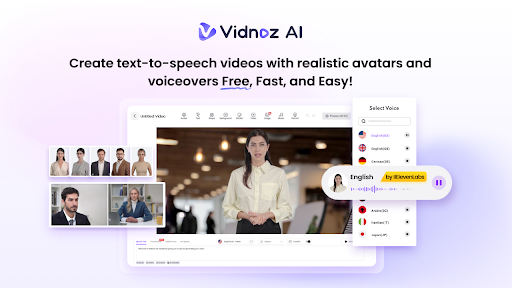
As we all know, employees require ongoing training to keep their knowledge and skills up to date. Regular learning sessions help them adapt to new technologies, understand changing workplace procedures, and perform their responsibilities more effectively. However, traditional training methods are time-consuming, expensive, and difficult to update. This is why many L&D professionals are turning to AI-powered platforms like Vidnoz AI to create high-quality, easy-to-understand training videos that enhance learning outcomes. Today, in this guide, we’ll learn everything about Vidnoz AI and why L&D professionals are using it to improve knowledge retention.
Part 1: What is Vidnoz AI?
If you’re looking for an AI-powered tool to create high-quality training videos, Vidnoz AI is the best option. It is an AI-powered video creation platform designed to help individuals and businesses produce professional-looking videos with a simple text prompt — no editing experience or professional help required. The platform is especially useful for L&D professionals who need to develop training, onboarding, explainer, and instructional videos quickly. The best part of this tool is that it is certified with ISO/IEC 2700:2022 for Information Security Management. Plus, it includes a wide range of AI tools, such as Online Video Editor, AI Voice Changer, AI Video Enhancer, AI Headshot Generator, AI Dance Photo, and more.
Part 2: Vidnoz AI Capabilities That Support Modern Learning
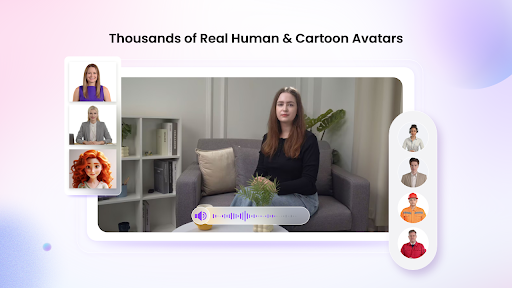
Vidnoz AI offers a wide range of capabilities that help L&D professionals create engaging, accessible, and scalable training content. Below, we’ve mentioned the top features of Vidnoz AI:
- Realistic AI Avatars: Vidnoz AI includes 1900+ AI avatars, such as doctors, nurses, teachers, students, bosses, customer support representatives, hosts, and more. L&D professionals can select an avatar that matches the training topic, industry, and target audience. Plus, Avatar Lite allows users to create a digital twin, while Expressive Avatar delivers more natural facial expressions, gestures, and emotions.
- Pre-Designed Templates: The program offers 2800+ Video Templates, allowing users to create various types of videos, such as how-to guides, training videos, explainer videos, onboarding materials, internal presentations, and more. These professionally designed templates help L&D teams save time and maintain consistency.
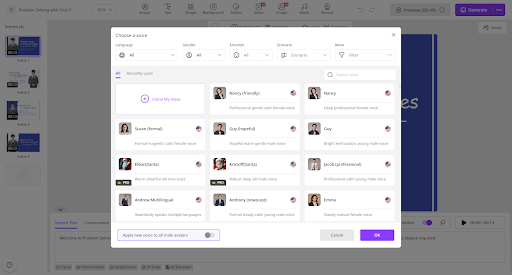
- Natural-Sounding AI Voices: One of the standout features of this tool is that it provides support for 2000+ AI voices, each with a unique style and accent. All the voices available on this program are powered by ElevenLabs, Google, and Microsoft. Additionally, users can select from a diverse range of voice styles, sentiments, and emotions to perfectly match the video tone.
- AI Video Wizard: Vidnoz AI offers an intuitive interface, allowing users to create high-quality videos without professional help. The AI Video Wizard feature enables users to generate complete videos from a simple text prompt or any source material — no editing experience required.
- Free Version: This tool also provides a free version, allowing users to create high-quality videos without spending a single penny. This option is ideal for small L&D teams, startups, and educators. The free version includes 30 free credits and features like AI Video Enhancer, Avatar Lite, Avatar Pro, Online Video Editor, AI Voice Changer, and more.
Part 3: Why L&D Professionals Are Leveraging Vidnoz AI
L&D professionals are increasingly using Vidnoz AI Video Generator to create engaging, affordable, and scalable employee training content. Below are the main reasons:
- Fast Content Creation: With the help of Vidnoz AI, users can quickly create high-quality videos without spending hours on filming, editing, or post-production.
- Lower Production Costs: Vidnoz AI helps L&D teams reduce video production expenses by removing the need for professional actors, a camera, and an editing crew.
- Multilingual Training: The program enables users to create training videos in 140+ languages, making it easier to educate employees across different countries.
Part 4: How to Create Training Videos With Vidnoz AI in 2026
The program enables users to create high-quality training videos through a simple and beginner-friendly process. Here is how to create training videos with Vidnoz AI:
- Go to Vidnoz AI’s official site and log in with your account. Choose the desired video template and AI avatar.
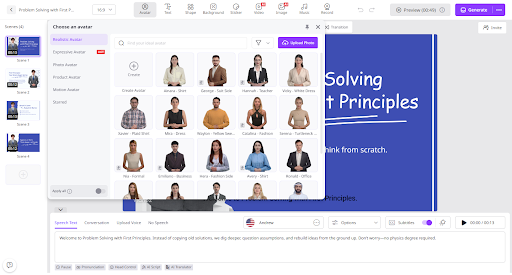
- Enter the video prompts and select the AI voice. Users can also select the language of their video. The program supports 140+ languages, including English and Spanish.
- Use the Online Video Editor to customize training videos according to your requirements. You can change the background, insert text, and add music.
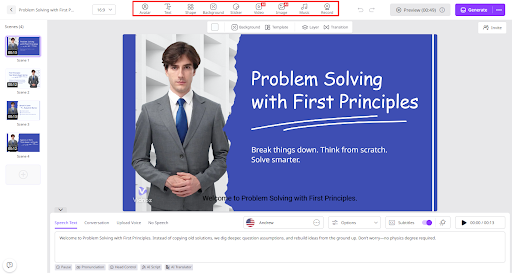
- Hit the “Generate” button to begin the video creation process. Within seconds, your AI training video will be ready. Preview and download it in desired formats, such as MP4.
Final Thoughts
Vidnoz AI is a valuable solution for L&D professionals who want to create engaging, affordable, and scalable training videos. Its realistic AI avatars, natural-sounding voices, and customizable templates enable users to produce professional learning content without cameras or advanced editing skills.
