
Close Menu
Bents MagazineBents Magazine
    What's New

    How to Crop a Video on iPhone Without Losing Quality

    June 23, 2026

    Dowel vs Velcro Handguards: Key Differences

    June 23, 2026

    Ascott Serviced Apartments Singapore: A Practical Corporate Stay Choice in 2026

    June 23, 2026

    Can a Rear-End Accident Cause a Concussion?

    June 23, 2026

    What Damages Can a Pedestrian Accident Victim Recover?

    June 23, 2026
    Trending
    • How to Crop a Video on iPhone Without Losing Quality
    • Dowel vs Velcro Handguards: Key Differences
    • Ascott Serviced Apartments Singapore: A Practical Corporate Stay Choice in 2026
    • Can a Rear-End Accident Cause a Concussion?
    • What Damages Can a Pedestrian Accident Victim Recover?
    • A Busy Parent’s Guide to Muscle Recovery Supplements
    • Nepal’s Most Loved Mountain Journeys: Annapurna Circuit, ABC & Mardi Himal trek Experience Guide
    • A Comprehensive Guide to Hiring a Plumber
    Bents MagazineBents Magazine
    • Home
    • Business
    • Celebrity
    • Crypto
    • Fashion
    • Health
    • Lifestyle
    • News
    • Technology
    • Contact Us
    Bents MagazineBents Magazine
    Home»Technology»How to Crop a Video on iPhone Without Losing Quality
    Technology

    How to Crop a Video on iPhone Without Losing Quality

    Prime StarBy Prime StarJune 23, 2026No Comments3 Mins Read
    Crop a Video on iPhone
    Share
    Facebook Twitter LinkedIn Pinterest Email Copy Link

    Cropping a video is simple if you have an iPhone—but the real challenge comes when you try to do it without losing quality. So, a lot of users edit videos right from the Photos app and wonder why the end result is a little pixelated or not specifically perfect for social media platforms.

    Fortunately, you can crop video online on an iPhone without any pro editing skills or paid apps. Be it vignetting, resizing for Instagram, or even generating content for YouTube Shorts: to maintain crisp & clear video in your footage, there are quick and easy methods to achieve it.

    This guide will introduce you to both the built-in method with iOS tools and a better one that helps crop video without quality loss for professional results.

    How to Crop a Video on iPhone (Using Built-in Photos App)

    One of the simplest ways to crop a video on an iPhone is by utilising its default Photos app. No downloading, and the phases are straightforward for all levels of individuals.

    Step 1: Open Photos App

    So head over to your iPhone and open the Photos app where you keep the video.

    Step 2: Select Your Video

    Find and tap on the video you want to edit.

    Step 3: Tap Edit

    Select the “Edit” option from the top right corner of the screen to bring up some editing tools.

    Step 4: Use Crop Tool

    Tap on the bottom select crop icon. The frame can be adjusted by dragging the corners

    Step 5: Save Changes

    When you’re satisfied with the output, hit Done, and your video will be saved.

    It is a fast method, but it lacks control over quality and export parameters.

    How to Crop a Video on iPhone Without Losing Quality (Best Method)

    The Photos app is really useful, but it will compress your video a little bit post-edit. For something of higher quality that will help you preserve as much quality as possible, a more suitable option is to use a free video cropping tool like VideoCutter.io. 

    In this way, you can crop video on iPhone without quality loss because it is applied at a much lower level, thus avoiding heavy compression or re-encoding.

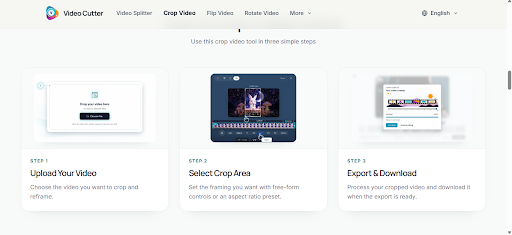
    All you have to do is drag and drop your video, edit the crop area, select the suitable aspect ratio, and export at high quality! It is particularly helpful if you are focused on content for professional off-label use, YouTube or social media that requires clarity in the message.
    Crop Video for Social Media from iPhone

    Various sizes of video are routine for social media platforms and a quick crop can be the difference between your content soaring or hitting the ground.

    For example:

    • Instagram Reels → 9:16 vertical format
    • TikTok → 9:16 vertical format
    • YouTube Shorts → 9:16 vertical format

    Cropping Video for YouTube Shorts — Keeping Movements in Centre and Framing to Fit Mobile Screens. The same goes for Instagram and TikTok, vertical videos perform best.

    Final Thoughts 

    When you need a simpler method to cut video on iPhone without the limits of built-in tools, it’s time to take a faster workaround. Although iPhone editing helps for the initial tweaks, a browser-based tool would allow enough control and clean output where it matters most.

    With VideoCutter. iO allows you to crop video quickly from your iPhone without any quality loss. No app, difficult setting to manage or sign up, just upload your video, crop the frame and export it in high quality within seconds. 


    Share. Facebook Twitter Pinterest LinkedIn WhatsApp Reddit Email Copy Link
    Prime Star

    Related Posts

    What Is a Scintillation Sensor? A Plain-English Guide for Scientists, Engineers, and Procurement Teams

    June 19, 2026

    The 2025 US Buyer’s Guide to Large Language Model Development Services: What to Look For Before You Sign

    June 19, 2026

    The Complete 2025 Buyer’s Guide to Cloud Hotel ERP for US Multi-Property Groups

    June 19, 2026
    Latest Posts

    How to Crop a Video on iPhone Without Losing Quality

    June 23, 2026

    Dowel vs Velcro Handguards: Key Differences

    June 23, 2026

    Ascott Serviced Apartments Singapore: A Practical Corporate Stay Choice in 2026

    June 23, 2026

    Can a Rear-End Accident Cause a Concussion?

    June 23, 2026

    What Damages Can a Pedestrian Accident Victim Recover?

    June 23, 2026
    Follow Us
    • Facebook
    • Twitter
    • Pinterest
    • Instagram
    Popular Posts
    Blog

    Mietmakler Explained: How Rental Agents Make Your Life Easier

    By AdminMarch 4, 20260

    Finding a home in Germany can feel like a big job. Some people spend weeks…

    Does a BBL Sag After Years? Here’s What to Expect Long-Term

    June 9, 2026

    Sean Kyle Swayze: The Story of Patrick Swayze’s Brother You Never Knew

    February 13, 2026

    The Key to Unlocking Flawless Surfaces

    April 2, 2026

    What Is Rosboxar? Discover the Future of Science, Business, and Packaging

    January 19, 2026
    Categories
    • Biography (9)
    • Blog (589)
    • Business (161)
    • Celebrity (540)
    • Crypto (4)
    • Education (13)
    • Fashion (26)
    • Games (7)
    • Guide (79)
    • Health (47)
    • Home Improvement (57)
    • Investment (1)
    • Lifestyle (67)
    • News (11)
    • Real Estate (5)
    • SEO (3)
    • Technology (97)
    • Travel (12)
    About Us

    Bents Magazine is a simple blog where we share fun and helpful content about celebrities, health, tech, crypto, and more. We write in easy words so everyone can enjoy and understand. Our goal is to inform, inspire, and make reading fun for all.

    Popular Posts

    Crocolini: The Healthy Green Everyone Is Loving in 2026

    April 4, 2026

    VIPBox: Why So Many Sports Fans Still Search for It

    April 8, 2026
    Latest Posts

    How to Crop a Video on iPhone Without Losing Quality

    June 23, 2026

    Dowel vs Velcro Handguards: Key Differences

    June 23, 2026
    Bents Magazine
    • Home
    • About Us
    • Privacy Policy
    • Contact Us
    © 2026 Bents Magazine All Rights Reserved

    Type above and press Enter to search. Press Esc to cancel.