



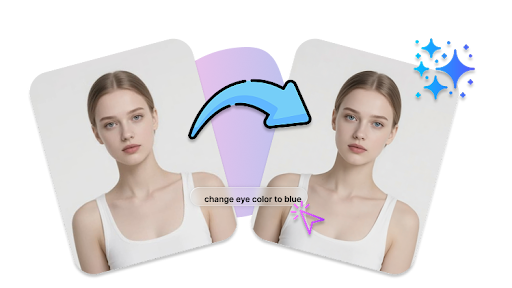
Changing eye color used to require advanced photo editing skills—but not anymore. With modern AI-powered tools, you can transform eye color online in seconds, even if you have zero editing experience. In this guide, you’ll learn how to change eye color online easily, what tools to use, and how to get the most natural-looking results.
Why Change Eye Color in Photos?
There are many reasons people want to edit eye color:
- Try a new look (blue, green, hazel, or even fantasy colors)
- Enhance portraits for social media
- Fix lighting issues that affect eye appearance
- Create creative or artistic edits
Online AI tools make this process fast, accessible, and surprisingly realistic.
Best Tool to Change Eye Color Online (Free & Private)
If you’re looking for a simple and reliable solution, Vidmud AI photo editor online is a strong option worth trying. Why Use Vidmud?
- AI-Powered One-Click Editing
Vidmud uses advanced AI algorithms to automatically detect and edit elements like eyes, background, and lighting—no manual skills required.
- All-in-One Photo Editing Toolkit
You can do much more than change eye color—enhance images, remove backgrounds, erase objects, apply filters, and even generate creative edits in one place.
- No Signup Required
You can start editing instantly—no account creation or login needed.
- Completely Free
No hidden costs or paywalls for basic features like eye color editing.
- Privacy Secured & No Data Saved
The platform ensures your photos remain confidential and safe. Your uploaded images are not stored, making it ideal for privacy-conscious users.
This makes Vidmud especially suitable if you want a quick, secure, and hassle-free editing experience.
How to Change Eye Color Online (Step-by-Step)
Here’s a simple process you can follow using Vidmud AI photo editor online:
Step 1. Upload a Photo
Upload your image directly to Vidmud AI photo editor. It works fully online, so there’s no signup required and no software to install.
Step 2. Edit with Prompt
Enter a simple prompt like: “change eye color to blue” or “make eyes green and brighter”. Vidmud’s AI will automatically understand your request and apply precise edits to the eyes—no manual selection needed.
Step 3. Download & Share
Preview the result, make quick adjustments if needed, then download your image in high quality. Your files remain 100% safe thanks to no data being saved and privacy-secured processing.
Tips for Natural-Looking Eye Color Changes
To get the best results, keep these tips in mind:
- Match the lighting – Choose colors that fit the photo’s lighting conditions
- Avoid over-saturation – Subtle edits look more realistic
- Preserve eye details – Keep iris texture and reflections intact
- Use high-quality images – Better input leads to better AI results
Is It Safe to Use Online Photo Editors?
Using an AI photo editor online can be safe—but it really depends on how the platform handles your data. Since you’re uploading personal images (often including faces), it’s important to understand the potential risks and how to avoid them. Many tools store or reuse your uploaded images, which can raise privacy concerns. When it comes to privacy, Vidmud AI photo editor online is designed with user security in mind:
- No Data Saved – Your images are not stored after editing
- Privacy Secured – No sharing or reuse of your photos
- No Signup Needed – No personal information required
- Browser-Based Processing – No downloads, reducing security risks
This makes Vidmud a great option for users who want to edit photos—like changing eye color—without worrying about where their data goes.
Final Thoughts
Changing eye color online has never been easier. With AI photo editors, you can achieve realistic, high-quality results in just a few clicks—no technical skills required.
If you want a fast, free, and privacy-focused solution, Vidmud online AI photo editor is a great choice. Its no-signup policy, secure processing, and AI-powered editing make it ideal for anyone looking to enhance their photos safely and effortlessly.
Ready to try a new look? Upload your photo and experiment with different eye colors—you might be surprised how natural it can look.
