



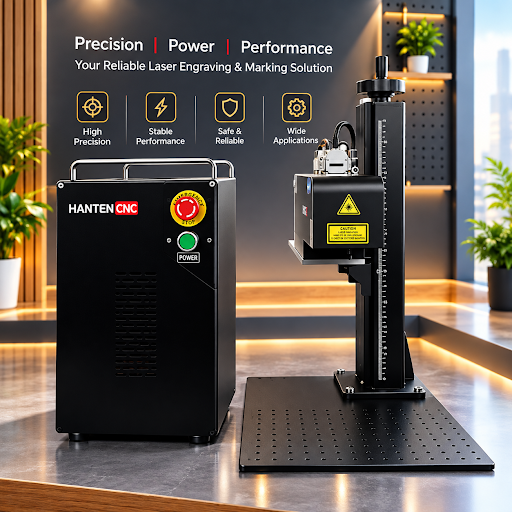
Laser marking machines help manufacturers add permanent information to products. Common applications include logos, serial numbers, QR codes, barcodes, and production dates. These marks support product identification, quality control, and traceability across many industries.
However, not every laser marking machine can handle every material or production task. Choosing the wrong equipment may lead to poor marking quality, slow production, or unnecessary operating costs. Before making a purchase, manufacturers should evaluate several key factors.
1. Identify the Materials You Need to Mark
Material compatibility should be the first consideration. Different laser sources work better with different materials. Choosing the right type helps produce clear marks while reducing the risk of burning, deformation, or surface damage.
Fiber laser marking machines are widely used for metals such as stainless steel, aluminum, copper, and carbon steel. They are common in automotive, hardware, electronics, and machinery manufacturing.
CO2 laser marking machines are often used for non-metal materials, including wood, leather, paper, acrylic, and certain plastics. They are suitable for applications such as packaging, consumer goods, and product decoration.
UV laser marking machines are useful for applications that require fine details and limited heat impact. They are often used for electronic components, circuit boards, and heat-sensitive plastics.
Before choosing a machine, confirm the exact material, surface finish, and required marking result. If you work with several materials, ask the supplier whether one system can meet all your needs. Sample testing can help you compare the results before placing an order.
2. Define Your Marking Requirements
The purpose of marking affects the machine configuration. Some manufacturers only need to add a simple logo or model number. Others require small text, detailed graphics, machine-readable codes, or deep engraving.
For example, a QR code used for product traceability must remain clear enough for scanners to read. A decorative logo may require a different level of detail and surface finish. Deep engraving also places different demands on laser power and processing time than basic surface marking.
Consider the following questions before selecting a machine:
- What information or design will you mark?
- How large is the marking area?
- How small must the text or pattern be?
- Does the mark need to resist wear or environmental exposure?
- Is surface marking sufficient, or do you need deeper engraving?
Clear requirements make it easier to compare equipment and avoid paying for features you do not need.
3. Match Laser Power and Marking Speed to Production
Laser power is an important specification, but higher power does not automatically mean better performance. The right power level depends on the material, marking depth, design complexity, and required production speed.
For simple identification marks on metal parts, a lower-power fiber laser may be sufficient. More demanding applications may require higher power or multiple passes. Precision applications can also depend heavily on beam quality, scanning systems, and parameter control.
Production volume matters as well. A workshop processing small batches may prioritize flexibility and ease of operation. A factory running a continuous production line may need faster marking speeds, automated loading, and stable performance over long operating periods.
When comparing machines, ask suppliers to demonstrate the actual marking time for your products. Evaluate the complete production cycle rather than relying only on the maximum speed listed in the specifications.
4. Check Marking Quality and Consistency
A good laser marking machine should produce clear, repeatable results. This is especially important for manufacturers that process large quantities of identical parts or use codes for product tracking.
Look at the sharpness of small text, the contrast of logos, the readability of QR codes, and the consistency of marks across different workpieces. If your products have curved, angled, or uneven surfaces, check whether the machine can handle those shapes.
For complex applications, features such as rotary attachments, larger worktables, or 3D dynamic focusing may improve flexibility. However, these options should match real production needs rather than simply increase the machine’s specifications.
Request sample marking on your own materials whenever possible. This gives you a more reliable basis for judging quality than product descriptions alone.
5. Evaluate Software and Ease of Operation
Software affects daily efficiency. Operators may need to import designs, adjust marking parameters, create serial numbers, or generate variable data for individual products.
Before purchasing, check which file formats the software supports and whether it can handle your existing design workflow. If you need to mark different product models, confirm how easily operators can switch between marking files.
For factories with more advanced production systems, integration may also be important. Depending on the equipment configuration, the machine may need to communicate with a PLC, conveyor, vision system, or other automation equipment.
Simple operation and stable software can reduce training time and help prevent mistakes during production.
6. Consider Maintenance and Long-Term Costs
The purchase price is only one part of the total cost of ownership. Maintenance, energy consumption, spare parts, operator training, and production downtime can affect the long-term value of a machine.
Ask about the expected service life of the laser source, routine maintenance requirements, warranty coverage, and the availability of replacement parts. You should also understand which tasks your own staff can handle and which require technical support.
A machine with a lower initial price may not be the most economical choice if it frequently interrupts production or requires expensive repairs. Compare the expected operating costs over several years when evaluating different options.
7. Compare Suppliers and After-Sales Support
The supplier is another important part of the purchasing decision. Reliable technical support can help resolve setup problems, improve marking parameters, and reduce downtime.
When comparing suppliers, review their experience with applications similar to yours. Check whether they offer sample testing, installation guidance, operator training, warranty service, and remote troubleshooting.
It is also useful to review their product range and customization options. If you are comparing a shortlist of suppliers, this guide to top laser marking manufacturers can help you identify companies for further evaluation.
Do not base your decision on brand recognition alone. The best supplier is one that understands your application and can provide a suitable machine, clear technical information, and dependable support.
8. Choose Equipment That Fits Future Needs
Production requirements may change as a business grows. You may need to process new materials, increase output, or add marking to an automated production line.
Consider whether the machine supports useful upgrades, such as rotary devices, vision positioning, larger marking areas, or automation interfaces. You should also confirm whether future applications would require a different laser source or a completely different system.
A suitable China laser marking machine supplier should be able to explain the available configurations and help you match them to your current workload and future plans.
Conclusion
Choosing a laser marking machine requires more than comparing prices and laser power. Material compatibility, marking requirements, production speed, quality, software, maintenance, and supplier support all affect the final result.
Start by defining your application and testing your materials. Then compare machines based on real production performance and long-term operating costs. This approach helps manufacturers choose equipment that delivers consistent marks, supports efficient production, and meets their business needs.
