
Close Menu
Bents MagazineBents Magazine
    What's New

    Offshore Foundation vs. Trust: Which One Is Ideal For HNWIs?

    June 16, 2026

    Reclaiming Balance: The Essential Guide to Outpatient Addiction Treatment

    June 16, 2026

    How AI Automation Is Transforming Modern Accounting and GST Workflows

    June 16, 2026

    Diamond Tennis Bracelets Trends, Styles and Buying Guide

    June 16, 2026

    When Does Your Business Need a High Capacity Document Scanner?

    June 16, 2026
    Trending
    • Offshore Foundation vs. Trust: Which One Is Ideal For HNWIs?
    • Reclaiming Balance: The Essential Guide to Outpatient Addiction Treatment
    • How AI Automation Is Transforming Modern Accounting and GST Workflows
    • Diamond Tennis Bracelets Trends, Styles and Buying Guide
    • When Does Your Business Need a High Capacity Document Scanner?
    • How Much Is a Black Cab in London? A Complete Fare Guide for 2026
    • Why More Homeowners Are Turning to Crate & Barrel for Timeless Style
    • Can Probiotics Affect Vaginal Odor?
    Bents MagazineBents Magazine
    • Home
    • Business
    • Celebrity
    • Crypto
    • Fashion
    • Health
    • Lifestyle
    • News
    • Technology
    • Contact Us
    Bents MagazineBents Magazine
    Home»Technology»When Does Your Business Need a High Capacity Document Scanner?
    Technology

    When Does Your Business Need a High Capacity Document Scanner?

    Sky Bloom ITBy Sky Bloom ITJune 16, 2026No Comments3 Mins Read
    Share
    Facebook Twitter LinkedIn Pinterest Email Copy Link

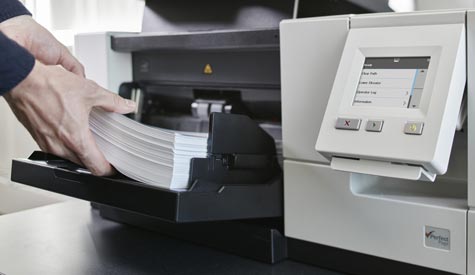
    As businesses continue to digitize records and automate workflows, document management has become a critical part of operational efficiency. While many organizations begin with basic scanning solutions, increasing document volumes can quickly expose limitations in existing processes. When teams spend excessive time handling paperwork, searching for records, or managing backlogs, it may be time to evaluate whether a high capacity document scanner is needed to support growth.

    High capacity scanning solutions are designed to process large volumes of documents quickly and accurately. They help organizations improve productivity, reduce manual workloads, and create faster access to business information. For companies experiencing rapid growth or handling large amounts of paperwork, upgrading document capture capabilities can have a significant impact on efficiency.

    Signs Your Current Scanning Process Is Holding You Back

    One of the clearest indicators that a business has outgrown its current scanning setup is the presence of document bottlenecks. Employees may spend considerable time waiting for documents to be scanned, indexed, or routed to the appropriate systems. These delays can slow decision making and reduce overall productivity.

    Frequent scanning errors can also signal that existing equipment is no longer meeting operational requirements. Misfeeds, poor image quality, and manual data entry requirements often create unnecessary work for staff members. As document volumes increase, these inefficiencies become more costly.

    Businesses that process invoices, forms, contracts, and customer records often benefit from advanced automation capabilities. Solutions that integrate with data capture software can automatically extract information, classify documents, and route files to the correct destinations. This reduces manual intervention and helps improve the accuracy of document management workflows.

    Another sign of inefficiency is the continued reliance on paper records. Physical storage consumes valuable office space and makes information retrieval more difficult. Organizations that struggle to locate documents quickly may find that upgrading their scanning processes provides immediate operational benefits.

    Benefits of Scaling Document Management Operations

    Investing in scalable document management technology offers advantages that extend beyond faster scanning speeds. High capacity scanners support business continuity by ensuring that critical information is captured, organized, and accessible whenever needed. This can improve collaboration across departments while supporting compliance and record retention requirements.

    Automation plays an increasingly important role in modern document workflows. By reducing repetitive tasks, organizations allow employees to focus on higher value responsibilities that contribute directly to business growth. Faster document processing also improves customer service by reducing delays associated with paperwork and administrative tasks.

    Many businesses also manage large numbers of receipts and expense records. A receipt scanner ocr solution can help convert paper receipts into searchable digital records, simplifying bookkeeping and improving financial organization. This capability is especially valuable for small businesses and growing organizations seeking more efficient expense management processes.

    As document volumes continue to increase, scalable scanning and document management solutions become essential for maintaining productivity. Businesses that proactively invest in high capacity scanning technology can reduce operational bottlenecks, improve information accessibility, and build workflows that support long term growth. By modernizing document capture processes today, organizations can create a stronger foundation for future success.

    Share. Facebook Twitter Pinterest LinkedIn WhatsApp Reddit Email Copy Link
    Sky Bloom IT

    Related Posts

    How AI Automation Is Transforming Modern Accounting and GST Workflows

    June 16, 2026

    7 Things You Must Know Before Scheduling an HVAC Crane Lift in Florida

    June 16, 2026

    How to Set Up an AI Receptionist for Your Hair Salon Without Losing the Personal Touch

    June 16, 2026
    Latest Posts

    Offshore Foundation vs. Trust: Which One Is Ideal For HNWIs?

    June 16, 2026

    Reclaiming Balance: The Essential Guide to Outpatient Addiction Treatment

    June 16, 2026

    How AI Automation Is Transforming Modern Accounting and GST Workflows

    June 16, 2026

    Diamond Tennis Bracelets Trends, Styles and Buying Guide

    June 16, 2026

    When Does Your Business Need a High Capacity Document Scanner?

    June 16, 2026
    Follow Us
    • Facebook
    • Twitter
    • Pinterest
    • Instagram
    Popular Posts
    Blog

    MMSBRE: How This Tool Can Boost Your Digital Workflows

    By AdminApril 5, 20260

    MMSBRE may look like a hard word at first, but the idea behind it is…

    SwayHorizonAi: first impression review

    March 2, 2026

    Spacious and Secure Truck Parking Solutions for Efficient Hauling and Rest Stops

    May 7, 2026

    Nerwey Explained: The Simple Idea Everyone Is Talking About in 2026

    March 9, 2026

    How Ottawa Students Can Improve Reading, Writing, and Conversation Skills in French

    April 23, 2026
    Categories
    • Biography (8)
    • Blog (575)
    • Business (145)
    • Celebrity (540)
    • Crypto (3)
    • Education (12)
    • Fashion (23)
    • Games (7)
    • Guide (73)
    • Health (43)
    • Home Improvement (52)
    • Investment (1)
    • Lifestyle (64)
    • News (9)
    • Real Estate (3)
    • SEO (3)
    • Technology (88)
    • Travel (10)
    About Us

    Bents Magazine is a simple blog where we share fun and helpful content about celebrities, health, tech, crypto, and more. We write in easy words so everyone can enjoy and understand. Our goal is to inform, inspire, and make reading fun for all.

    Popular Posts

    How Multimedia Presentation Software Helps Presenters Work More Efficiently

    May 13, 2026

    The Role of a Good Marriage Counsellor in Handling Depression and Marital Issues Simultaneously

    April 8, 2026
    Latest Posts

    Offshore Foundation vs. Trust: Which One Is Ideal For HNWIs?

    June 16, 2026

    Reclaiming Balance: The Essential Guide to Outpatient Addiction Treatment

    June 16, 2026
    Bents Magazine
    • Home
    • About Us
    • Privacy Policy
    • Contact Us
    © 2026 Bents Magazine All Rights Reserved

    Type above and press Enter to search. Press Esc to cancel.