



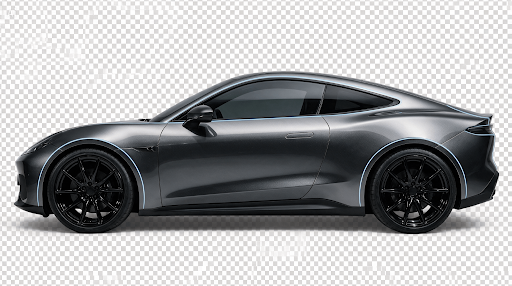
A car photo with a clean background looks professional. Dealerships, classified listing sites, automotive bloggers and designers all depend on sharp vehicle images, yet most photos are taken in parking lots, driveways or showrooms where the surroundings distract from the vehicle. Editing the background used to demand advanced skills and hours of manual work. Today, artificial intelligence has made the process faster and far more accessible. This guide explains why background removal matters, how the technology works, which methods are available and how to get the best results.
Why Background Removal Matters for Automotive Images
Buyers form an opinion about a vehicle within seconds of seeing a photo. A cluttered background filled with other cars, trash bins, power lines or uneven pavement pulls attention away from the vehicle itself. Learning to remove background from car images in a clean and consistent way helps every listing look credible and organized, and the remove background from car approach is now simple enough that even beginners can achieve a polished studio style look from a basic smartphone photo.
The benefits go beyond appearance. A uniform background makes it easier to compare multiple vehicles in the same catalog. It also allows marketers to place a car on a branded backdrop, a showroom scene or a simple white canvas for printed brochures. Consistency builds trust, and trust encourages inquiries.
How Automatic Background Removal Works
Modern background removal tools rely on machine learning models trained on millions of images. These models learn to recognize the visual difference between a foreground subject and everything behind it. When you upload a vehicle photo, the software analyzes color, texture, edges and shape, then produces a mask that separates the car from its surroundings.
Cars are surprisingly difficult subjects. They have glossy paint that reflects the environment, transparent windows that show the background through the glass, thin antennas, mirrors with irregular outlines and wheels with spokes that contain gaps. A well trained model handles these details by predicting soft edges and preserving semi transparent areas, so the final cutout does not look jagged or artificial.
Common Methods to Isolate a Vehicle
There are several ways to separate a car from its background, and the right choice depends on your skill level, time and quality requirements.
Manual selection tools. Professional editing software offers pen tools, lasso tools and layer masks. Skilled editors can produce excellent results, but each image may take thirty minutes or longer. This method suits a small number of hero images where every pixel matters.
Quick selection and smart tools. Many editing programs include one click selection features that detect the main subject. They save time, though the edges around mirrors, tires and shadows usually need cleanup.
Online AI tools. Browser based services process an image in seconds with no software installation. They suit sellers, small businesses and content creators who handle many photos and need dependable results quickly.
Batch processing and APIs. Large dealerships and marketplaces often need to process hundreds of images each day. Automated pipelines and application programming interfaces allow developers to connect background removal directly to their upload workflow.
Tips for Taking Photos That Edit Cleanly
The quality of the source image strongly influences the final result. A few simple habits make the editing stage much easier.
Shoot in even, diffused light. Early morning or late afternoon light, or an overcast sky, reduces harsh reflections and deep shadows. Avoid direct midday sun, which creates bright hotspots on the hood and roof.
Keep some distance between the car and the background. When the vehicle is parked right against a wall or a hedge, edges blend together and the software has a harder time finding the boundary.
Use a sharp, high resolution image. Blurry photos produce soft, uncertain edges. Make sure the whole vehicle is in the frame with a little space around it so the cutout does not clip bumpers or mirrors.
Choose a camera angle that shows the vehicle clearly. A three quarter front view is popular because it displays the front and side profile together. Keep the camera at a moderate height to avoid distorting the proportions.
Handling Shadows, Reflections and Windows
Shadows deserve special attention. A car cut out with no shadow can look as if it is floating. After removing the original background, add a soft contact shadow beneath the tires, or use a subtle gradient to ground the vehicle on its new surface. This small step adds realism and prevents the image from looking pasted.
Reflections can also reveal the old environment. If the paint shows a mirrored tree line or building, the new background may look inconsistent. Choose a replacement scene with similar lighting, or keep the backdrop neutral, such as white or light gray, so reflections feel natural.
Windows require care as well. Some tools remove the glass entirely, leaving holes in the cutout, while better ones keep a slight tint so the cabin remains visible. Always zoom in and inspect the window area, wheel arches and the gaps between spokes before exporting.
Choosing the Right Output and Background
Once the car is isolated, think about where the image will be used. Marketplace listings usually perform best with a plain white or light neutral backdrop because it keeps attention on the vehicle and meets platform guidelines. Social media posts and advertisements allow more creative freedom, such as city skylines, scenic roads or branded colors.
Save the cutout as a PNG file if you want to keep transparency for later use. Export a JPG version for web pages where file size matters. Keep a consistent image size and aspect ratio across your catalog so galleries look tidy on both desktop and mobile screens.
Common Mistakes to Avoid
Many people rush the final review and publish images with leftover fringes, missing mirrors or rough edges around the roofline. Others choose a background with lighting that conflicts with the vehicle, which makes the composite look unnatural. Another frequent mistake is over editing, such as changing the paint color or reflections so much that the buyer receives a misleading impression. Honest, accurate images protect your reputation and reduce disputes after a sale.
Conclusion
Clean vehicle images support better first impressions, easier comparisons and a more professional brand. Whether you manage a single listing or an entire inventory, the ability to remove background from car photos gives you control over how each vehicle is presented. Start with a well lit, high resolution photo, choose a tool that matches your volume and quality needs, and take a moment to check shadows, windows and edges before publishing. With a few good habits and the right technology, polished automotive imagery is within reach for almost anyone.
