



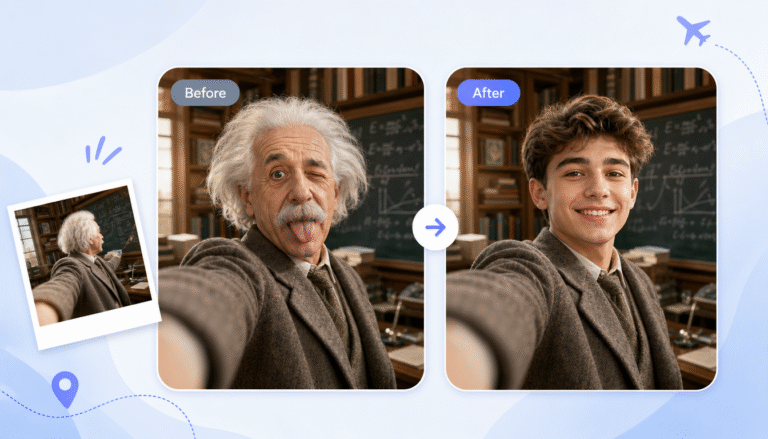
A face swap video can make a school project more fun, but it needs to be planned with care. The goal isn’t just to make classmates laugh. A good video should help explain your topic, fit your teacher’s rules, and respect the people whose faces you use.
I’ve helped students use face swap tools for history clips, book reports, science explainers, and media studies projects. The best ones were not the flashiest. They had a clear idea, clean source images, short scenes, and an honest note that AI editing was used. If you treat the face swap as part of the storytelling instead of the whole project, your final video will feel more polished and school appropriate.
Plan the Idea Before You Open the Tool
Start with the assignment, not the software. Read the project sheet and ask yourself what the video has to prove, explain, or show. If your teacher wants a two minute presentation about a historical figure, your face swap should support that lesson. For example, you could appear as a scientist explaining their discovery, or as a character from a novel reflecting on a key scene.
This is also the right time to decide who will appear in the video. Use your own face when possible because it keeps permission simple. If you want to use a classmate, teacher, family member, or friend, ask first and explain exactly how the video will be used. For a school project, I’d avoid swapping faces onto real people in embarrassing scenes, political clips, or anything that could be misunderstood outside the classroom.
A simple browser tool is usually enough for a student project. I’ve seen students use EasyFaceSwap because it keeps the process straightforward and doesn’t require advanced editing skills. Still, the tool won’t fix a weak idea. A clear script and a short video will matter more than fancy effects.
Keep the video short enough to control. Thirty to ninety seconds is a good range for most class projects unless your teacher asked for more. Short videos are easier to edit, easier to present, and less likely to include mistakes you miss because you’re tired. If your project needs more information, you can add voiceover, captions, or a live explanation when you present it.
| Project type | Face swap idea | Best use |
|---|---|---|
| History report | Student as a historical figure | First person explanation |
| Book project | Student as a main character | Character analysis |
| Science lesson | Student as a famous scientist | Discovery summary |
| Media studies | Student in a news style clip | Bias or message analysis |
Prepare Your Script, Images, and Video
Write a short script before you record anything. You don’t need perfect movie dialogue, but you do need a beginning, middle, and ending. A strong school video often starts with one clear sentence that tells the viewer what they’re about to learn. Then it gives two or three key points and ends with a short summary.
Record your base video in bright, even light. Face swap tools work better when the face is clear, front facing, and not covered by hair, hats, hands, or heavy shadows. I usually tell students to stand near a window during the day, but not with the window behind them. Backlight makes the face dark, and the swap often looks blurry or strange.
Choose a source photo that matches the video angle. If your video shows you facing the camera, use a front facing photo. If the video has side movement, pick an image with a similar angle. This one detail can make the difference between a swap that looks smooth and one that feels awkward.
Use clean files and name them clearly. A file called “history_intro_take2.mp4” is easier to find than “IMG_4829.” The same goes for photos. When I’ve watched students rush this part, they often upload the wrong version or lose the best take right before class. A little file organization saves a lot of stress.
If your teacher allows online tools, the Video Face Swap page is the part you’d use for the actual swap. Upload the video, choose the face image, and let the tool process it. Processing time can vary, so don’t wait until the morning the project is due. Give yourself time to review, redo, and export.
Create the Face Swap Video
Once your files are ready, upload the base video first. This is the clip where the face will be replaced. Watch the preview if the tool offers one, and check that the face stays visible for most of the video. If your face turns away often or leaves the frame, the result may flicker or look uneven.
Next, upload the face image you want to apply. Use a high quality image with a clear face, natural lighting, and no heavy filter. School projects don’t need perfect realism, but they do need to be clear enough for classmates to understand. A low quality image often creates a soft, stretched, or distorted face.
After the tool finishes processing, watch the whole video from start to finish. Don’t just check the first five seconds. Look for odd mouth movement, warped eyes, sudden jumps, or parts where the face disappears. Small issues are normal, but big glitches can distract from your message.
If the result looks off, fix the source files before blaming the tool. Record the base video again with steadier lighting. Try a face image that matches the angle better. Trim out sections with fast movement. In my experience, one careful rerecord usually improves the final video more than trying the same bad files over and over.
Download the finished video and save a backup. If you plan to edit it further, keep both the swapped version and the original. That way, if something goes wrong in your video editor, you don’t have to recreate the whole face swap from scratch.
Tips and Best Practices
Add captions or title cards if your teacher will play the video in a noisy classroom. Captions also help if your audio is a little weak. You can keep them simple: a title at the start, labels for key points, and one closing slide with your name and sources if required. Don’t cover the face with large text, though, because that can make the swap look messy.
Use voiceover if the mouth movement doesn’t match well. This is a useful trick for school projects because the viewer focuses on the lesson instead of lip sync. You can show the face swap video while narrating over it, or you can record a separate audio track after the swap is done. A calm, clear voice often makes the project feel more serious.
Be honest that AI editing was used. Many teachers now expect students to label AI generated or AI edited media. You don’t need to make a huge announcement, but you can add a note at the end that says the video includes an AI face swap for a class project. This shows responsibility and can protect you from questions later.
Think about tone. A funny video can still be respectful, but it should not mock a real person’s appearance, accent, identity, or beliefs. I’ve seen projects lose points because the tech became a joke at someone else’s expense. If you’d feel uncomfortable showing the video to the person whose face appears in it, don’t use it.
Keep the final file easy to play. MP4 is usually the safest choice for school computers, projectors, and learning platforms. Test the file on the device you’ll use in class if you can. A great video won’t help much if it won’t open during your presentation.
Common Mistakes and Conclusion
The most common mistake is starting with the face swap before deciding the lesson. That leads to a video that looks interesting for a few seconds but doesn’t answer the assignment. Your teacher is still grading your understanding, research, and presentation. The face swap should make those things easier to follow, not replace them.
Another mistake is using poor lighting. Dim bedrooms, colored LED lights, and strong shadows can confuse face detection. If your first test looks strange, record again in better light before you spend time editing. It’s much faster to fix the original video than to hide problems later.
Students also make videos too long. The longer the clip, the more chances there are for glitches, awkward pauses, and off topic moments. A short, clear scene with a strong script usually earns a better reaction than a long clip with repeated jokes. If you have more to say, add it in your live presentation or a written slide.
Don’t forget permission and school rules. Some schools have clear policies about AI tools, student images, and online uploads. If you’re unsure, ask your teacher before you begin. A quick question can prevent a lot of trouble, especially if your video includes other people’s faces.
A face swap video works best when it’s planned like any other school project. Choose a clear concept, record clean footage, use a strong face image, review the result, and be honest about how you made it. When the technology supports the lesson and the people involved are treated with respect, your project can be creative, memorable, and still appropriate for class.
